Charging and readiness
PS5 Charging Station Guide
This guide explains when a dedicated DualSense charging station is useful and how it fits into a clean, ready-to-play PS5 setup.
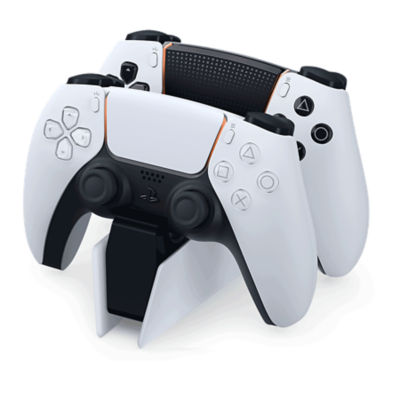
What a Charging Station Solves
Charging is not exciting until it interrupts a session. A dedicated station solves a simple readiness problem: controllers need a place to live and a reliable way to charge when nobody is thinking about cables. This is especially useful in homes with two controllers, shared profiles, or family play. When a controller is placed back on the dock after use, the next session starts with less friction.
The value is not only battery. It also reduces cable clutter and keeps console USB ports free for other devices. A controller lying on a couch, shelf, or table is easy to forget. A controller on a charging station has a routine. That routine is what makes the accessory more useful than its simple feature list suggests.
One Controller vs Two Controllers
A charging station becomes much more useful when there are two DualSense controllers in rotation. One controller can charge while the other is in use, or both can be stored after local multiplayer. If a household often plays together, a two-controller dock helps avoid the common problem where the second controller is dead when a friend or family member wants to join.
For a single-controller owner, the decision is closer. A USB-C cable may be enough if charging habits are consistent. The station is still cleaner and more automatic, but the need is lower. The buying question is whether convenience and organization are worth it before buying another controller.
How It Fits a Clean Setup
A good PS5 setup is not only about performance. It is about reducing small annoyances. The charging station creates a fixed place for controllers and makes the entertainment area look more intentional. That matters in living rooms where controllers otherwise end up scattered. It also makes it easier to see at a glance whether controllers are docked.
For people building a PS5 accessory setup gradually, the charging station pairs naturally with extra controllers. If you buy a second DualSense, charging becomes more important. If you add DualSense Edge, the charging routine may differ depending on accessories and cable habits, so check official compatibility notes before assuming every controller behaves the same way with every dock.
Cable Charging Still Has a Place
A charging station does not make USB-C cables useless. Cables remain helpful for updates, wired play, temporary charging, and supported device connections. The dock is a convenience tool, not the only charging method. A practical setup can include both: the dock for daily storage and a cable nearby for firmware, travel, or emergency charging.
The mistake is thinking every charging problem requires a new accessory. If one controller is always charged by habit, a dock may be optional. If controllers are constantly misplaced or dead, the dock can pay for itself in convenience quickly. The right answer depends on behavior, not just product specs.
What to Check Before Buying
Before buying, confirm the product is the official DualSense Charging Station or another accessory with the exact compatibility you need. Check whether it supports the controller models in your setup, where it will sit, whether it needs its own power connection, and how it affects cable management. Also check current official details because packaging and availability can vary by region.
Think through the actual physical space. A charging station should be easy to reach after play. If it is hidden behind the TV, people may not use it. If it is beside the console or on a media shelf, the habit is easier. The best accessory is the one the household will use consistently.
Editorial Method and Update Notes
This PS5 Charging Station Guide page is written as independent editorial guidance, not as a product listing or checkout page. The goal is to answer the main search question first, explain the tradeoffs in plain language, and then point readers toward official PlayStation resources for current product details. That approach keeps the guide useful even when colors, regional availability, bundles, or support wording changes over time.
Related PS5 Accessory Guides
PS5 Charging Station Guide FAQ
Does the DualSense Charging Station charge two controllers?
The official DualSense Charging Station is designed around charging two DualSense controllers. Check the current official product page for exact details and compatibility.
Is charging by cable bad for DualSense?
Cable charging is a normal way to charge a controller. A charging station is mainly about convenience, storage, and keeping USB ports free.
Do I need a charging station for one controller?
No. It is convenient for one controller but more valuable when you own two controllers or share the console.
Where should the charging station sit?
Place it somewhere easy to reach after play. If it is visible and convenient, people are more likely to dock controllers consistently.
Does a charging station help local multiplayer?
Yes, indirectly. It helps keep multiple controllers ready so guests or family members are less likely to find a dead controller.
Where should I verify compatibility?
Use the official PlayStation Direct or PlayStation accessory page for current charging station compatibility and availability.